Help Center
Introducing the AI Referral Channel

AI tools like ChatGPT and Claude are growing in popularity, and they are changing the way people research and find products and services.
Due to this, there’s a whole new category of AI monitoring tools popping up that will tell you how often your brand gets mentioned or cited by ChatGPT, Claude, Gemini, etc.
That’s useful to know, but they are not the numbers your business actually runs on. What matters is how many leads you got from those AI tools, how many of those leads became paying customers, and how much revenue came with them.
No AI mention tools track that. Attributer does.
Since Wednesday 7 October 2026, leads who arrive at your site from an AI tool like ChatGPT or Claude get marked as Channel = AI referral.
How AI visitors were categorised before 7 October
Until 7 October 2026, a visitor who found you through an AI tool ended up in one of four channels, depending on what their browser happened to pass along:
- Direct traffic. If they clicked through from an app (like the ChatGPT, Claude or Gemini phone apps) the visit arrived with no referring domain and no UTM parameters, so there was nothing for Attributer to go on and we marked the Channel as Direct traffic.
- Referral. If they were using an AI tool in the browser (so claude.ai or perplexity.ai) and they clicked through to your website, the referring domain (i.e. claude.ai) was passed through. Because it wasn’t a recognised search engine or social media site, Attributer put these into the Referral channel.
- Other campaigns. If they clicked a link to your site in ChatGPT, it added its own tag to the link (utm_source=chatgpt.com). Attributer saw a campaign tag it didn’t recognise as Email, Paid search, Paid social, etc. so it categorised it into the Other campaigns channel.
- Organic search. If the visitor was using Gemini in their browser and they clicked a link to your site, they were put into the Organic search channel because Gemini lived at gemini.google.com and that ended in google.com.
All of this logic made sense originally, but as AI tools continued to grow in popularity (and as other analytics tools like Google Analytics started to add AI to their channel groupings), the time had come for us to add it as well.
What happens now
Attributer now recognises visitors who arrive from AI tools and puts them into a new channel, called AI Referral.
It looks at two things to determine whether a lead came from an AI tool:
- Referring domain. If the referring domain is the domain of a recognised AI tool (like chatgpt.com, claude.ai, etc) and the link didn’t carry any UTM parameters, then the lead will be categorised into the AI Referral channel.
- UTM parameters. If the lead arrives at your site with UTM parameters and those UTM parameters match the rules we use to categorise leads into the AI Referral channel (like utm_source=chatgpt.com), then the lead will be marked as Channel = AI referral.
Alongside the channel, Attributer fills in the drilldown fields the same way it does for every other channel:
- Channel = AI referral
- Channel Drilldown 1 = the name of the AI tool, for example ChatGPT, Claude, Gemini or Perplexity
- Channel Drilldown 2 = the domain the visitor arrived from, for example chatgpt.com
- Channel Drilldown 3 = None (there’s no deeper level of detail for an AI referral)
Attributer currently recognises 13 AI tools: ChatGPT, Perplexity, Gemini, Copilot, Claude, Meta AI, Grok, DeepSeek, Mistral, Poe, You.com, Duck.ai and Phind.
The full list, along with the domains and tags we recognise each one by, is in the help article List of recognised AI assistants. New tools appear every few months, so we’ll keep that list current as they show up and start sending real traffic.
It’s also worth mentioning that if you also use Google Analytics, this lines up with the AI Assistant channel Google added to GA4 in May 2026. So you can look at GA4 and see how many visitors came from AI, then look at your CRM and see how many of them became leads, customers and revenue.
A before and after example
Let’s say you run marketing for an accounting firm. Someone asks ChatGPT to recommend an accountant for a small business, clicks through to your site, reads your pricing page and fills in your contact form.
Before 7 October 2026, that lead would have landed in your CRM looking like this:
- Channel = Other campaigns
- Channel Drilldown 1 = chatgpt.com
- Channel Drilldown 2 = No Campaign
- Channel Drilldown 3 = No Terms
Since 7 October 2026, the same lead looks like this:
- Channel = AI referral
- Channel Drilldown 1 = ChatGPT
- Channel Drilldown 2 = chatgpt.com
- Channel Drilldown 3 = None
You can now easily see how many leads you got from AI tools, which tools are sending you the most customers, etc.
Limitations
There are a couple of limitations that are worth noting:
- Clicks from the apps can still show as Direct traffic. When someone clicks a link inside the ChatGPT, Claude or Gemini phone apps, the visit usually arrives with no referring domain (because fundamentally they didn’t come from another website, they came from an app). And if the link isn’t tagged with any UTM parameters (i.e. utm_source=chatgpt.com), there’s nothing to recognise, so it’s recorded as Direct traffic. ChatGPT is currently the only major AI tool that adds UTM parameters to its links, so a good share of ChatGPT app clicks are caught and categorised correctly. Claude and Gemini don’t tag their links today, so their app clicks aren’t.
- Google’s AI Overviews and AI Mode stay in Organic search. Both AI Overviews and AI Mode live on the same search engine results page as the standard 10 blue links, so clicks from those just come through with google.com as the referring domain. There’s no way to tell whether the user clicked a link in the AI Overview or whether they just clicked one of the standard blue links, so those will still be marked as Channel = Organic search. Gemini is different though. It has its own address (gemini.google.com) so leads from there do get categorised into the AI Referral channel.
It’s worth noting that these are not limitations of Attributer. Anthropic doesn’t add UTM tags to links clicked in Claude so there’s no way to track where they came from, and Google provides no way to separate clicks in AI Overviews from clicks on the standard search results. Because of this, every analytics tool on the planet has the same limitations (including Google Analytics).
What you need to do
For most customers, nothing. The change happened inside the Attributer script you have installed on your website, and the new value has been appearing in your hidden fields and your CRM for new visitors since 7 October 2026.
Leads recorded before 7 October keep the channel they were given at the time. Nothing already in your CRM has changed, so your reports will only show AI referral leads from 7 October onwards.
The only thing you need to think about is if you’ve built anything that depends on the list of Channels that Attributer passes through.
This could include:
- A picklist or dropdown for the Channel field in your CRM. If the Channel field in your CRM is configured as a picklist or dropdown with set values, then you’ll need to update that to also accept ’AI referral’ (written exactly like that, with a lower-case r, the same way as ’Organic search’ and ’Paid search’).
- An automation or workflow. If you’ve built any automations or workflows that use the value of the Channel field to do something in your CRM (like score or route leads), then you’ll need to update it to take into account there is a new channel called ’AI referral’.
- A report or dashboard. If you’ve got a report or dashboard set up that filters certain channels, then you’ll need to update it. For instance, you might have an ’Organic’ dashboard that only shows leads from organic channels like Organic search, Organic social, Referral, etc. You would need to update this to also include leads from the new ’AI referral’ channel.
3 reports you can run
The AI Referral channel opens up some new reporting capabilities inside your CRM (or wherever you build reports using the data provided by Attributer). Here are some example reports you could run with the new data to see how AI referral is performing for you as a channel:
1. Leads by channel
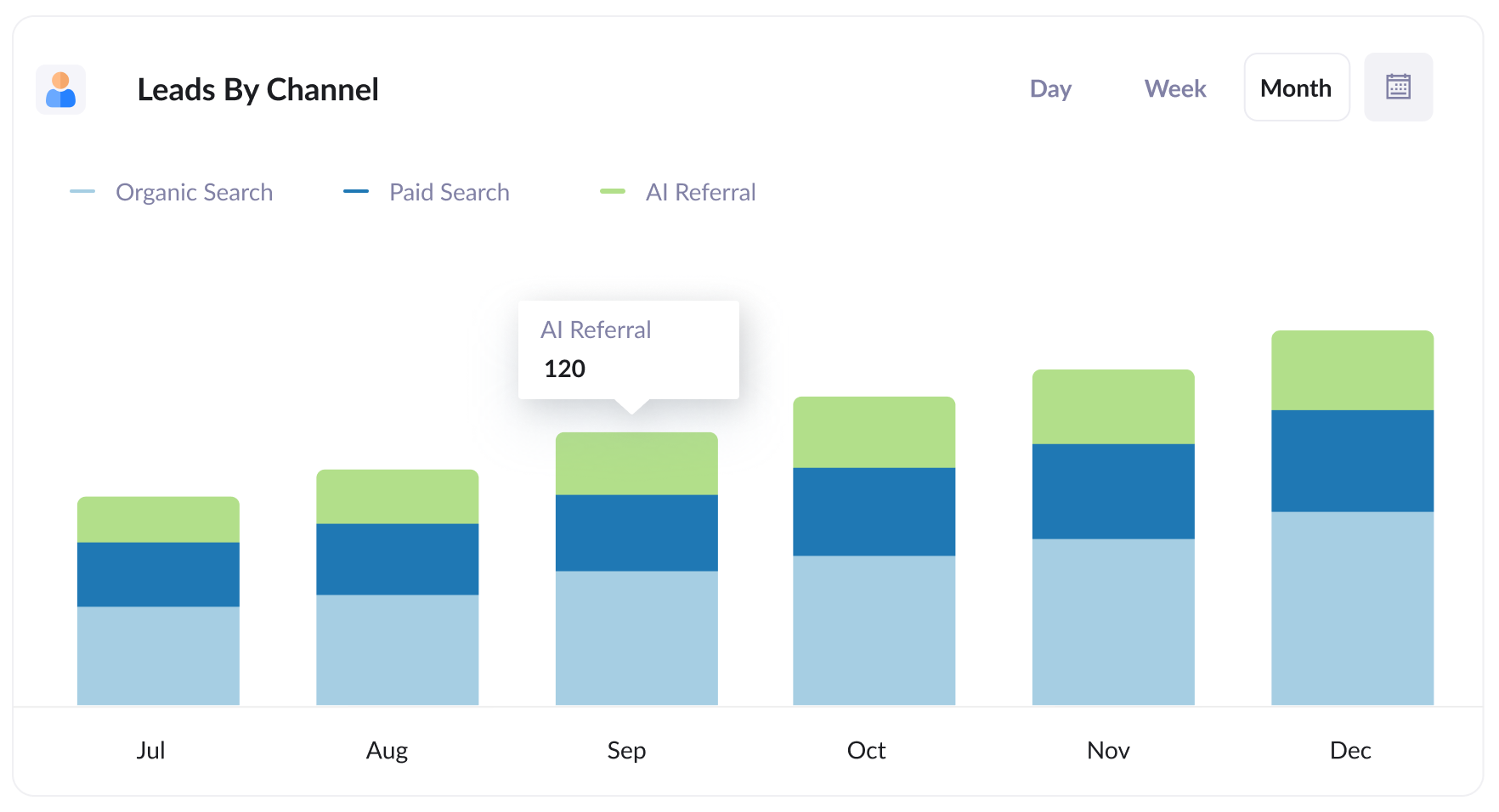
This shows how many leads you got each month, broken down by channel, with AI Referral sitting right next to Organic search, Paid search, Paid social and the rest.
It helps you understand how AI referral is performing as a channel compared to all the other ones you’ve been investing in for years, like Organic search, Paid search, Paid social, etc.
2. Customers by AI tool
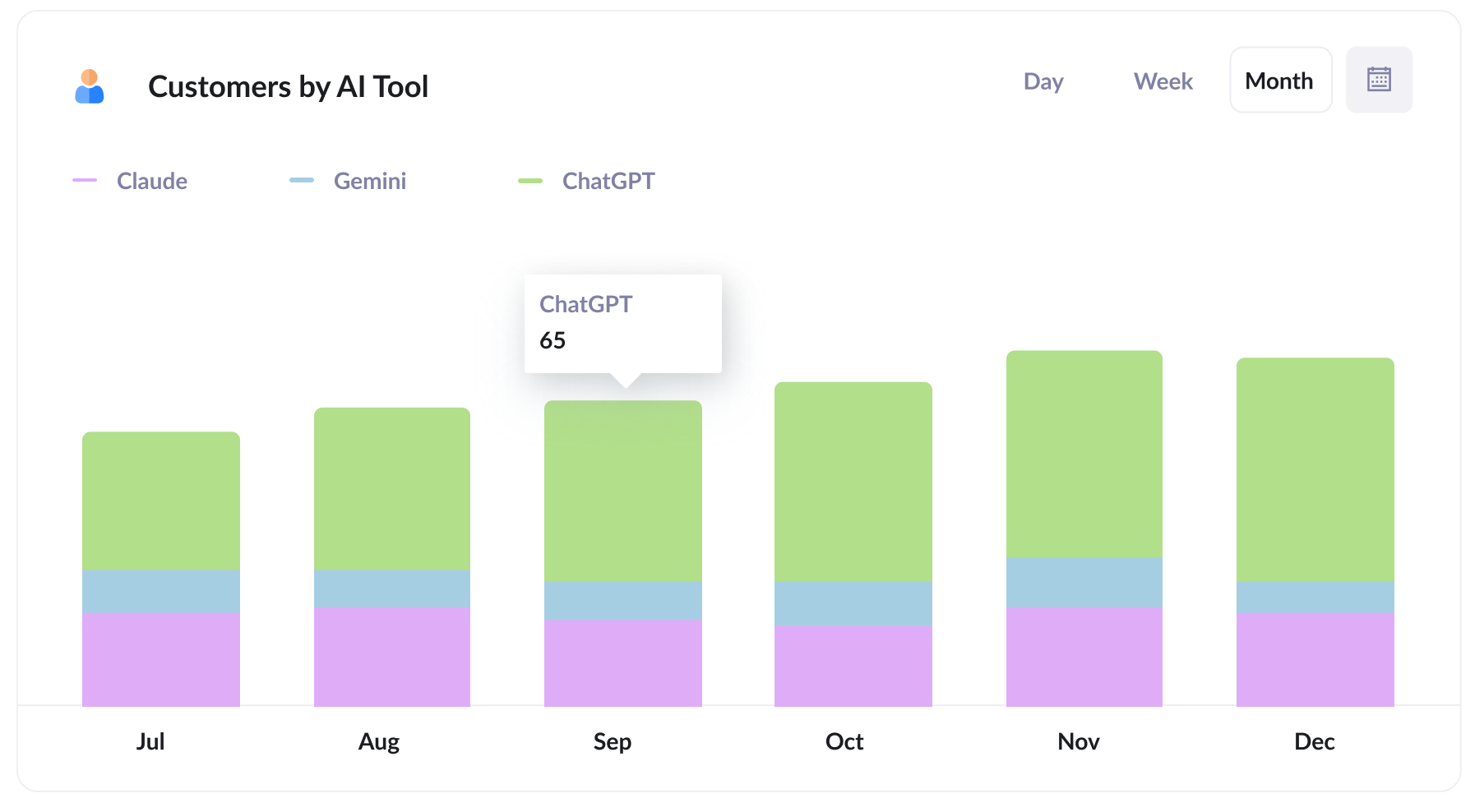
This one uses Channel Drilldown 1 to split your AI Referral customers by which tool sent them, so you can see whether ChatGPT is bringing you more paying customers than Claude, Gemini or Perplexity.
Being mentioned by an AI tool and being chosen by its users are two different things. This report shows you the second one, and if nearly all of your AI customers come through one tool, that’s the one worth understanding and optimising for.
3. Revenue from AI Referral by landing page
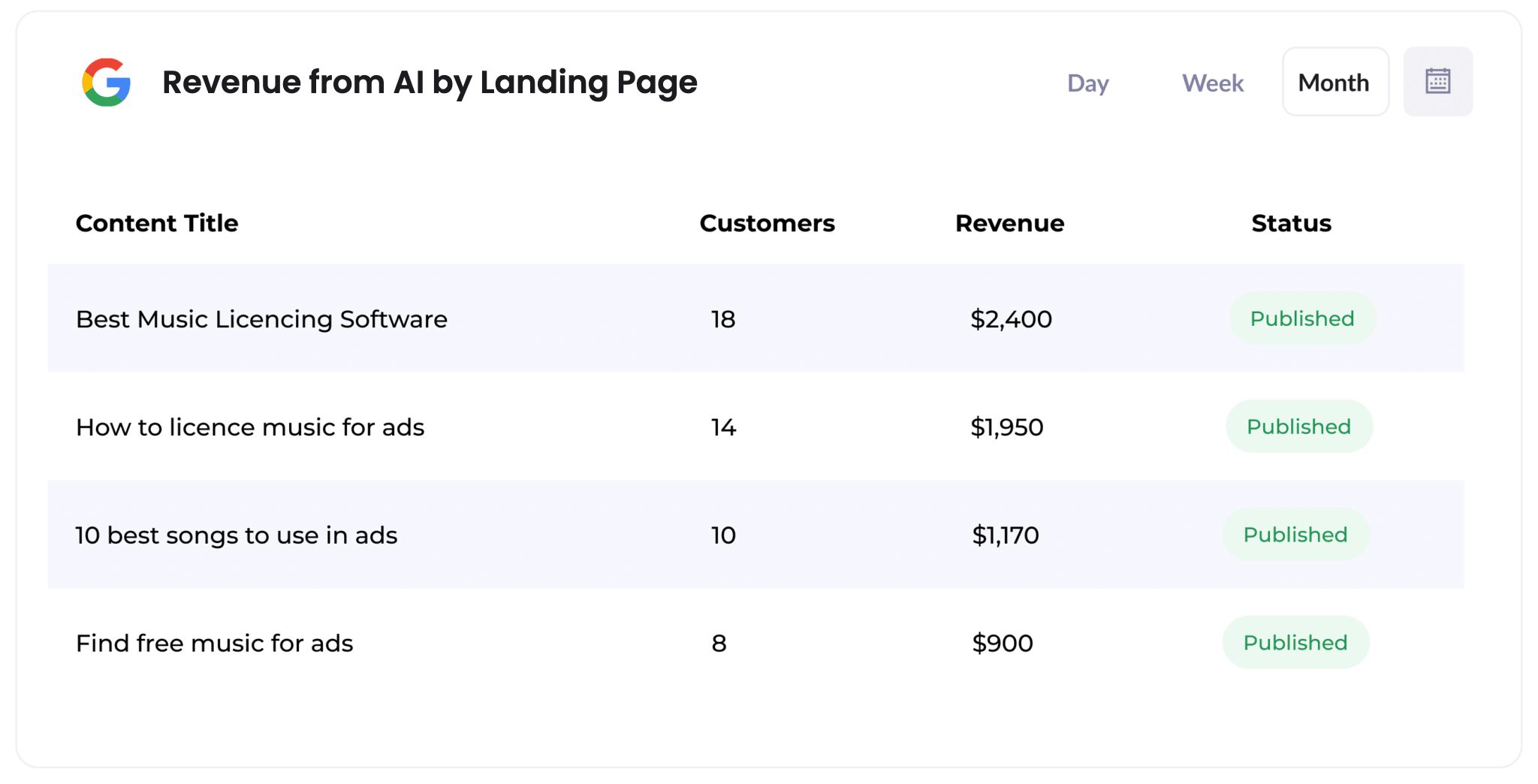
For this report, filter to just the AI Referral leads, group them by Landing Page, then add up the number of customers and revenue.
This tells you which pages the AI tools are actually sending buyers to. If most of your AI revenue traces back to a handful of pages, you’ve got a very clear brief for what to write next.
Wrap up
As AI tools continue to grow in popularity, it’s going to become increasingly important to be able to measure how many leads & customers you get from them.
Attributer now helps you do that, in the same fields and the same CRM you already use.
Can't find the answer you need? Contact us!
Our team are available to answer any questions you have