Help Center
Gravity Forms won’t submit after adding Attributer hidden fields

If you’ve just added Attributer’s hidden fields to a Gravity Form, you might find the form stops submitting. When someone clicks the submit button, Gravity Forms shows this error on each of the six Attributer fields.
The value of this hidden field has been reset to default because the submitted value does not match the expected value.
While it might seem scary, the good news is that the fix is a single checkbox.
How to fix it
In WordPress, go to Forms and open the form where you are experiencing this issue. Click one of the Attributer hidden fields to open its settings, and then open the Advanced tab. Tick the ‘Allow field to be populated dynamically’ checkbox.
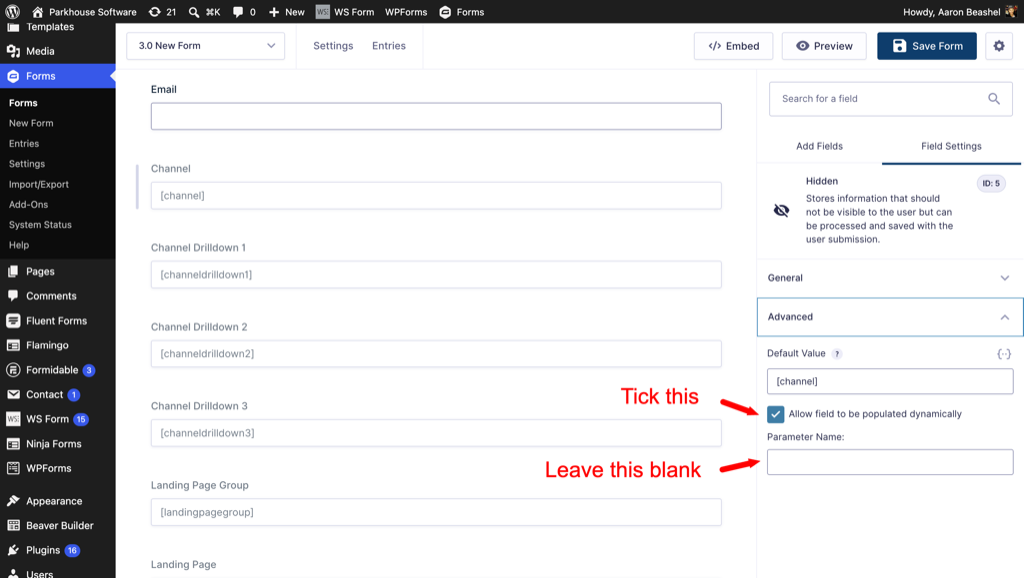
When the Parameter Name box appears, leave it blank. You don’t need to fill it in.
Leave the Default Value exactly as it is, so [channel], [channeldrilldown1] and so on. That’s what Attributer looks for when it fills the field.
Repeat for the other hidden fields, then save the form.
Why it happens
Gravity Forms 3.0 introduced a security feature called State Validation. When your page loads, Gravity Forms looks at what the Default Value is and stores it as a ‘state’. Then when someone submits the form, it compares the values against the original ‘state’ and if anything has changed, it assumes somebody has tampered with the form and blocks the submission.
It’s designed for situations where you want the Default Value to be submitted exactly as you entered it in the Gravity Forms admin. So if you set ‘Contact Us Form’ as the Default Value for a hidden field called ‘Lead Source’, then it would protect that from being tampered with.
Gravity Forms lets you turn this check off if needed, using a setting called ‘Allow field to be populated dynamically’. Given that Attributer works by overwriting the original Default Values with real attribution data, then it’s important you turn this check off in order for Attributer to work.
Why we say to leave Parameter Name blank
Ticking the checkbox is all that’s needed to fix the problem, and the Parameter Name box is a separate feature you don’t need.
The Parameter Name field basically captures whatever value is in the URL when the form is submitted. So if you named the parameter ‘channel’, anyone could visit your page with ?channel=Google Ads on the end and set the value themselves, which would put made up data into your CRM. Leaving it blank means Attributer stays the only thing writing to those fields, so your reporting stays accurate.
Do I need to go and fix my existing forms?
Maybe. This only affects forms that were built using Gravity Forms 3.0 or later, or an existing form that was built on Gravity Forms 2.0 but the hidden fields were added using Gravity Forms 3.0 or later.
If your form was built before you updated to Gravity Forms 3.0 and you haven’t modified it since, it will carry on working, and updating to Gravity Forms 3.0 won’t break it. Only forms where the hidden fields were created after the update are affected.
The quickest way to check is simply to submit the form yourself and see whether it goes through. If it does, there’s nothing to do.
Can't find the answer you need? Contact us!
Our team are available to answer any questions you have