Help Center
Set up Attributer with Tawk.to

Attributer is a little bit of code you add to your website. It tracks where your visitors are coming from (I.e. Paid Search, Paid Social, Organic Search, etc) and then passes the data into Tawk.to with each new chat session.
In order for it to work, you need to follow the steps below:
Step 1: Copy the below code
The first step to setting Attributer up with Tawk.to is to copy the below code to your clipboard. This snippet of code uses Tawk.to’s built-in ‘Custom Attributes’ feature to pass the data through.
<script>
/**
 * Attributer + Tawk.to Integration
 * Passes marketing attribution data to Tawk.to chat widget
 * https://attributer.io
 */
(function() {
  'use strict';

  var MAX_WAIT_TIME = 15000;
  var POLL_INTERVAL = 200;
  var startTime = Date.now();
  var attributesSent = false;

  function isAttributerReady() {
    return !!(window.document.FlareTrk &&
              window.document.FlareTrk.data &&
              window.document.FlareTrk.data.drillData);
  }

  function isTawkReady() {
    return !!(window.Tawk_API &&
              typeof window.Tawk_API.setAttributes === 'function');
  }

  function buildAttributes(data) {
    try {
      var attrs = {};
      var drill = data.drillData || {};

      var safeString = function(str, limit) {
        return (typeof str === 'string' ? str : '').substring(0, limit);
      };

      if (drill.channel) attrs['Channel'] = drill.channel;
      if (drill.drillDown1) attrs['Channel-Drilldown-1'] = drill.drillDown1;
      if (drill.drillDown2) attrs['Channel-Drilldown-2'] = drill.drillDown2;
      if (drill.drillDown3) attrs['Channel-Drilldown-3'] = drill.drillDown3;
      if (drill.drillDown4) attrs['Channel-Drilldown-4'] = drill.drillDown4;

      if (data.landing_url) {
        attrs['Landing-Page'] = safeString(data.landing_url, 255);
      }
      if (data.landing_page_group) {
        attrs['Landing-Page-Group'] = safeString(data.landing_page_group, 255);
      }

      return attrs;
    } catch (e) {
      return {};
    }
  }

  function sendAttributes() {
    if (attributesSent) return;
    if (!isAttributerReady() || !isTawkReady()) return;

    var data = document.FlareTrk.data;
    var attrs = buildAttributes(data);

    if (Object.keys(attrs).length === 0) return;

    window.Tawk_API.setAttributes(attrs, function(error) {
      if (!error) {
        attributesSent = true;
      }
    });
  }

  function checkAndSend() {
    if (attributesSent) return;
    if (Date.now() - startTime > MAX_WAIT_TIME) return;

    if (isAttributerReady() && isTawkReady()) {
      sendAttributes();
    } else {
      setTimeout(checkAndSend, POLL_INTERVAL);
    }
  }

  function init() {
    window.Tawk_API = window.Tawk_API || {};

    checkAndSend();

    var originalOnLoad = window.Tawk_API.onLoad;
    window.Tawk_API.onLoad = function() {
      if (typeof originalOnLoad === 'function') originalOnLoad();
      checkAndSend();
    };

    var originalOnChatStarted = window.Tawk_API.onChatStarted;
    window.Tawk_API.onChatStarted = function() {
      if (typeof originalOnChatStarted === 'function') originalOnChatStarted();
      attributesSent = false;
      startTime = Date.now();
      checkAndSend();
    };
  }

  init();

})();
</script>
Step 2: Add the code beneath your Tawk.to embed code
The next step is to place this additional snippet of code directly beneath the embed code you got from your Tawk.to account (the one that installs Tawk.to on your website).
See screenshot below:
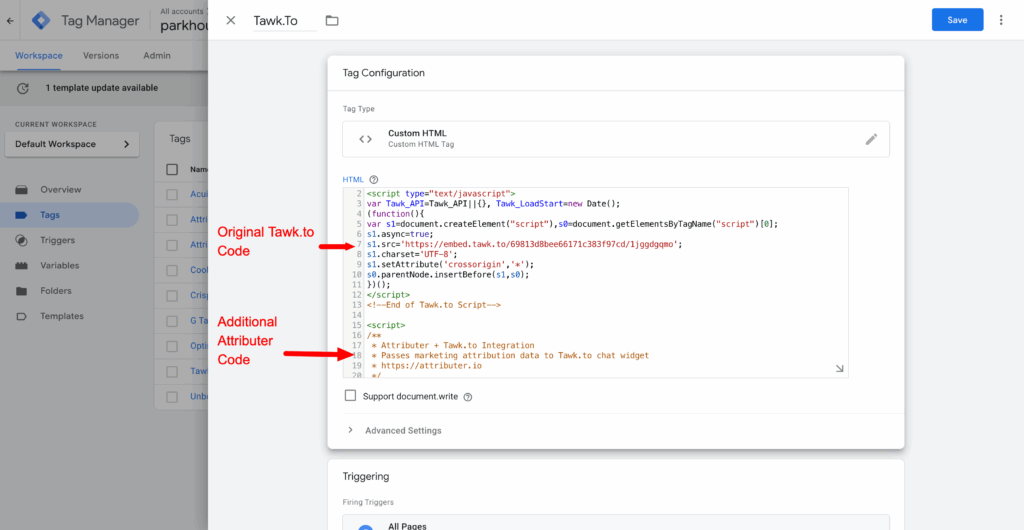
Note: If you prefer, you can also add this code as a separate Custom HTML tag (if you’re using Google Tag Manager). The code is designed to work regardless of load order, so it doesn’t need to be placed directly beneath your Tawk.to code if you’d prefer to keey it separate.
Step 3: Test it works
The final step is to test it works. You can do this by navigating to your website in a new incognito window and starting a new chat.
You should see the data come through in the Details tab of the chat window:
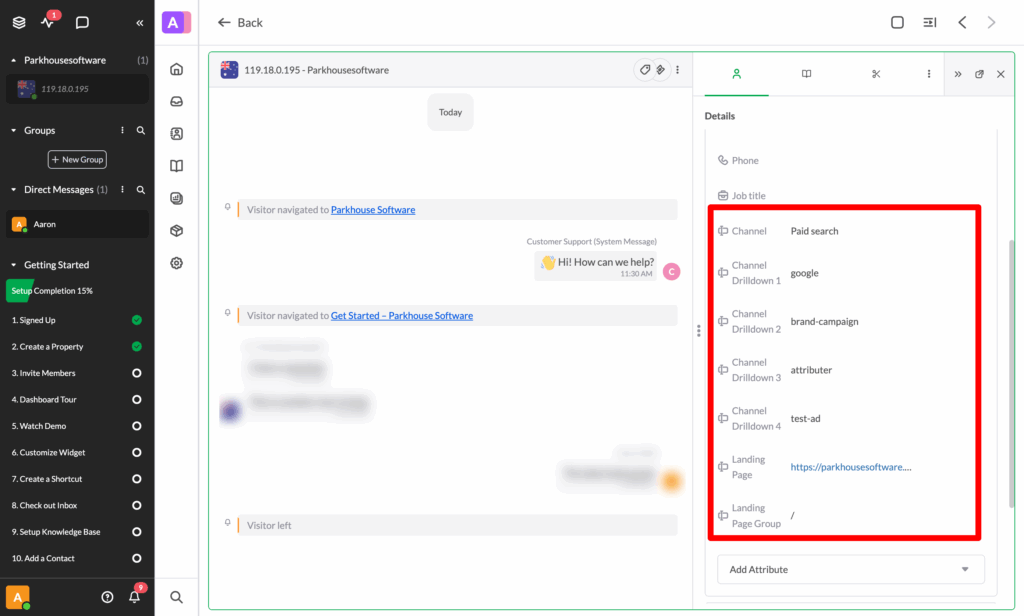
If the data is coming through and appearing in the Details tab like the screenshot above, then you have set up Attributer with Tawk.to correctly!
We would also recommend reading this article for further information on how to test different channels (I.e. Organic Search, Paid Search, etc).
Can't find the answer you need? Contact us!
Our team are available to answer any questions you have